Markov
AI 101
Setting the stage
- ImageNet, the big vision thing, came out in 2006.
- AI without words
- The LLM was developed in 2017
- AI with words
- ChatGPT became “prominent” in 2023
- AI in the news
Looking at Google
- We’ll do Google relative - they competed in ImageNet, developed the LLM, and have a pretty major one (Gemini).
- How big is Google?
- In 2006, 122 billion USD market cap
- In 2017, 729 billion USD market cap
- In 2026, 3680 billion USD market cap
- Why does this matter?
Scaling
- There are a lot of words.
- And there are more words in a sentence than there are in general.
- For example, that previous line contained “in” twice.
- Basically, more than 9 inputs (for dice).
- The thing that held up LLMs was not having enough computing power to encode all words.
Our example
- We’ll use an extremely restricted example, inspired by a meme I saw once.
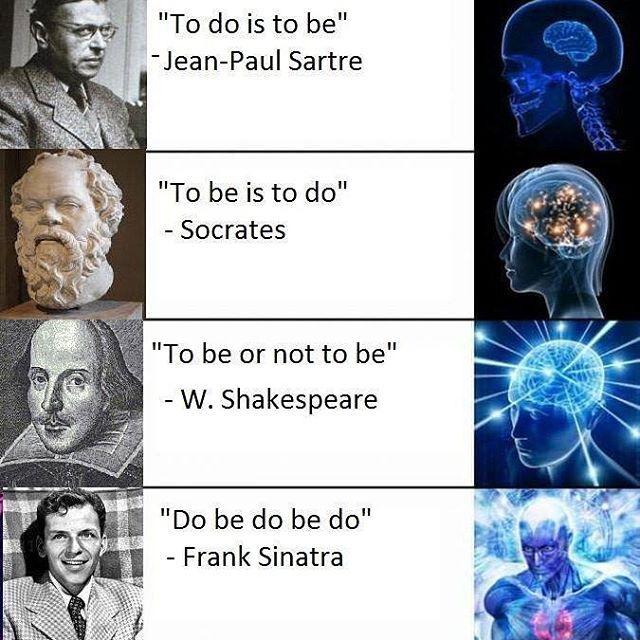
Punch into Colab
- I just typed these into Colab.
- I used all lower case and no punctuation (and change “not” to “no” for length)
- This is a similar “simplifying assumption” as regarded dots as only present or absent.
Tokenizing
- There’s a core insight in computational linguistics called “tokenization”.
- Somehow, have to break up words into things that can be recognized by a “sensory neuron”.
- I treat individual words as tokens.
- This could be an entire class.
Sets
- I want to see how many unique words there are.
- Obviously, “to” appears many times.
- I use a “set”, a mathematical object that is a (1) collection with (2) no duplicates.
- They also aren’t ordered, which doesn’t really matter here.
Unique words
- How many words are there across all three phrases?
- I take the union of sets, which is all elements in at least one set.
- Only 6 words! Not too bad!
- Only one more than our compressed dice.
Making a Network
- We can make something that looks an awful lot like a perceptron!
Edge Weights
- How do we determine edge weights?
- Or perhaps, what are we trying to do?
- Let’s imagine what our task is:
- We want to generate text given some text, so…
- Given a word, produce the next word.
Words-to-words
- So, what do we do?
- Let’s take a look at our “quotes”.
- Let’s see which words follow which other words.
- Perhaps at which probability.
- Let’s plug those in as edge weights.
First things first
- Let’s just look at one word - the first word we see.
[['to', 'do', 'is', 'to', 'be'],
 ['to', 'be', 'is', 'to', 'do'],
 ['to', 'be', 'or', 'no', 'to', 'be'],
['do', 'be', 'do', 'be', 'do']]- Okay, that word is “to”.
Second things second
- What words can follow “to”.
- Well, it looks to me like “do” and “be”
- I can write some code to make sure.
- The point of this class isn’t writing that code, but I will show it for the interested student!
Finding what’s next
- I loop over all quotes.
- I loop over all words in the quotes.
- If the current word is “to”, I save the next word.
- I loop over all words in the quotes.
- I look at all the next words.
Do this for all words
- We aren’t restricted for doing this just for “to”
- Do it for all the words!
- We have to add one special case.
- We check quote length to make sure there is a next word.
Let’s see it
[['to', 'to'], ['no'], ['is', 'be', 'be'], ['is', 'or', 'do', 'do'], ['do', 'be', 'be', 'do', 'be', 'be'], ['to']]- Oh… that is tough to understand.
- We’ll use another coding thing that I should mention.
- I think it will be important to AI in the future, not seeing much usage now.
Key-Value Storage
A dictionary
- What we really need is something a lot like a dictionary.
- Rather just have a list of lists of words, we want a list of words for each starting word.
- Dictionaries also contain “lists of words” (definitions) for each word.
- In computing, we term this “key-value storage”.
- Keys are words
- Values are definitions.
Colab has dictionaries
- There so happens to be something called a dictionary (well, a
dict) I can use.
Adding keys
- We add things to dictionary as key-value pairs
- We take the name of the dictionary, like
my_values - We add box brackets
[] - Within those brackets, we give the key (e.g. the word for which we are storing the definition
- We use single-equals assignment to set the value of the key within the dictionary.
- We take the name of the dictionary, like
- Like this:
Seeing values
- It is easy enough to see a value from here.
- Same as setting a value, just without single-equals assignment.
- We take the name of the dictionary, like
my_values - We add box brackets
[] - Within those brackets, we give the key (e.g. the word for which we are storing the definition
- We take the name of the dictionary, like
Back To Work
Use A dict
- Same as before, but we use a dictionary.
- The key is “before” or “first” word.
- The value is the “next” or “second” word.
Easier to see
- Recall - we are doing this to find edge weights
{'is': ['to', 'to'], 'or': ['no'], 'do': ['is', 'be', 'be'], 'be': ['is', 'or', 'do', 'do'], 'to': ['do', 'be', 'be', 'do', 'be', 'be'], 'no': ['to']}- A bit easier visually with some formatting.
Takeaways
is ['to', 'to']
or ['no']
do ['is', 'be', 'be']
be ['is', 'or', 'do', 'do']
to ['do', 'be', 'be', 'do', 'be', 'be']
no ['to']- “no” only precedes “to”.
- “or” only precedes “no”
- “is” only precedes “to”
- Others are more complex.
Early sketch
- “no” only precedes “to”.
- “or” only precedes “no”
- “is” only precedes “to”
Meaning of weights
- We have a problem now.
- Historically, we have used determinism
- Every single time we see a six-sided die, we say it represents a six.
- Now we must use non-determinism
- Sometimes when we see a “to”, it is followed by “be”
- Sometimes it is followed by “do”.
- How do we handle this?
Calculate Weights
- Let’s take an edge weight to be the probability.
- “to” will have an edge of weight \(\frac{2}{3}\) going to “be”.
Let’s look at “be”
- The way I think of this is:
- After a “be”, at 25% probability see an “is”
- After a “be”, at 25% probability see an “or”
- After a “be”, at 50% probability see an “do”
Generating Text
- So, if we want to generate text.
- We look at the current word.
- We flip a coin or roll a die.
- For “be” we use a four-sided die.
- And two numbers correspond to “do”.
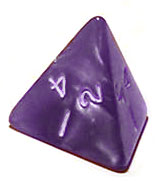
Rolling Die in Colab
- We have already seen random numbers, when setting up our perceptron.
- It is easy enough to.
- Generate a random number between zero and one.
- Multiply it by the number of “next words”
- Round or truncate to a whole number
- Look up the number in that position, which is now the next number.
In Colab
- Here’s the code - don’t worry about understanding it unless you want.
nextsis the dictionary we made earlier.
Try it out
- We’ll ask for the next word several times and hope to get different answers.
Generating text
- We can now use a neural network to generate text!
- We just provide a starting word.
- We will also provide a length, though there’s ways around that!
Clean it up
- Rather than printing each word, we’ll add words together into one big thing to print.
- We’ll also put all the code in a function.
- We’ll allow the function to accept a starting word and a length.
Some examples
More examples
- Longer.
- Start with other words.
Bonuses
If Time
- We can look at start and stop tokens.
- We can discuss attention.
Summary
What we learned
- You can generate text with neural networks.
- We used a single layer, but of course…
- It seems an awful lot like you can do anything by stacking them.