---
title: Neural Networks
---
# Today
- Follow up on the *adjacency matrix* [lab](51_sudoku.qmd)
- I will live-code this then post my solution on the website and link it here.
- Bipartite graphs
- Neurons
- Our first *neural network*
- (Single layer, fully-connected)
## Matrix
- We recall matrices from the [Sudoku](51_sudoku.qmd) lab.
## The Adjacency Matrix
> [In mathematics, a matrix (pl.: matrices) is a rectangular array of numbers or other mathematical objects with elements or entries arranged in rows and columns.](https://en.wikipedia.org/wiki/Matrix_(mathematics))
$$
\begin{bmatrix}1 & 9 & -13 \\20 & 5 & -6 \end{bmatrix}
$$
## Indices
- Mini-Sudoku is 4$\times$4.
- General, matrices may be $m$ by $n$.
$$
\mathbf{A} = \begin{pmatrix}
a_{11} & a_{12} & \cdots & a_{1n} \\
a_{21} & a_{22} & \cdots & a_{2n} \\
\vdots & \vdots & \ddots & \vdots \\
a_{m1} & a_{m2} & \cdots & a_{mn} \\
\end{pmatrix}
$$
## Indices
- There are $4 \times 4 = 16$ total "positions" in a Mini-Sudoku
- Each of these 16 "positions" are either *impacted* or *non-impacted*
- Each position is *impacted* by:
- Other positions in the same row.
- Other positions in the same column.
- Other positions in the same $2\times2$ submatrix
## Encoding
- Vs. refer to each as, e.g. $a_{mn}$.
- Just give each "position" a unique number:
:::: {.columns}
::: {.column width="50%"}
*Tedious*
||||
|-|-|-|-|
|$a_{1,1}$|$a_{1,2}$|$a_{1,3}$|$a_{1,4}$|
|$a_{2,1}$|$a_{2,2}$|$a_{2,3}$|$a_{2,4}$|
|$a_{3,1}$|$a_{3,2}$|$a_{3,3}$|$a_{3,4}$|
|$a_{4,1}$|$a_{4,2}$|$a_{4,3}$|$a_{4,4}$|
:::
::: {.column width="50%"}
*Brief*
||||
|-|-|-|-|
|1|2|3|4|
|5|6|7|8|
|9|10|11|12|
|13|14|15|16|
:::
::::
## Example
- Consider the top left position.
||||
|-|-|-|-|
|***1***|**2**|**3**|**4**|
|**5**|**6**|7|8|
|**9**|10|11|12|
|**13**|14|15|16|
## Order
- We can write these down in numerical order.
|1|2|3|4|5|6|7|8|9|10|11|12|13|14|15|16|
|-|-|-|-|-|-|-|-|-|--|--|--|--|--|--|--|
| | | | | | | | | | | | | | | | |
## Correspondence{.smaller}
- They correspond to the following *matrix* positions
|1|2|3|4|5|6|7|8|9|10|11|12|13|14|15|16|
|-|-|-|-|-|-|-|-|-|--|--|--|--|--|--|--|
|$a_{1,1}$|$a_{1,2}$|$a_{1,3}$|$a_{1,4}$|$a_{2,1}$|$a_{2,2}$|$a_{2,3}$|$a_{2,4}$|$a_{3,1}$|$a_{3,2}$|$a_{3,3}$|$a_{3,4}$|$a_{4,1}$|$a_{4,2}$|$a_{4,3}$|$a_{4,4}$|
## 1's
- We can mark *adjacent* positions as one (`1`)
- Like this.
|1|2|3|4|5|6|7|8|9|10|11|12|13|14|15|16|
|-|-|-|-|-|-|-|-|-|--|--|--|--|--|--|--|
|1|1|1|1|1|1| | |1| | | | 1| | | |
## 0's
- We can mark *adjacent* positions as one (`1`)
- And others as zero.
|1|2|3|4|5|6|7|8|9|10|11|12|13|14|15|16|
|-|-|-|-|-|-|-|-|-|--|--|--|--|--|--|--|
|1|1|1|1|1|1|0|0|1| 0| 0| 0| 1| 0| 0| 0|
## Code Cells
- We can take that last row and treat it as *list*.
- Lists begin and end with boxy brackets `[]`
- Lists contain *multiple* values, like `0` or `1`
- The values are separated by commas `,`
```{.py}
[1,1,1,1,1,1,0,0,1,0,0,0,1,0,0,0]
```
- Was:
|1|2|3|4|5|6|7|8|9|10|11|12|13|14|15|16|
|-|-|-|-|-|-|-|-|-|--|--|--|--|--|--|--|
|1|1|1|1|1|1|0|0|1| 0| 0| 0| 1| 0| 0| 0|
## Further
- This corresponds to things adjancent to position "1"
- Next, we can do things adjacent to position "2".
- Same submatrix, same row, different column.
```{.py}
[1,1,1,1,1,1,0,0,0,1,0,0,0,1,0,0]
```
## Definition
- We can combine each list into a *list of lists*
```{.py}
[
    [1,1,1,1,1,1,0,0,1,0,0,0,1,0,0,0],
    [1,1,1,1,1,1,0,0,0,1,0,0,0,1,0,0],
    ...
]
```
- And so on.
# Types of Graphs
## A Type of Graph
- We have seen a few types of graphs.
- Amtrak
- Dichotomous key
- River valley
- Sudoku
## Amtrak
- Amtrak routes. (Linear graph)
```{dot}
//| echo: false
graph Hiawatha {
rankdir=TB;
bgcolor="transparent"
node [shape=circle, fontcolor = "#ffffff", color = "#ffffff"]
edge [color = "#ffffff"]
MKE -- MKA -- SVT -- GLN -- CHI
}
```
## Decision Tree
- The decision tree. (Tree graph)
```{dot}
//| echo: false
digraph OakKey {
bgcolor="transparent"
node [shape=box, fontcolor="white", color="white"];
edge [color="white", fontcolor="white"];
// Questions/Nodes
Start [label="Leaves are smooth with no teeth or lobes?"];
Evergreen [label="Laves evergreen?"];
GrowthHabit [label="Large Tree (not shrub)?"];
LeafShape [label="Leaves more than 3x long as wide"];
Bristles [label="Lobes/teeth bristle-tipped?"];
LobeCount6 [label="3 or fewer lobes?"];
LobeCount7 [label="9 or fewer lobes?"];
// Species (Leaf nodes)
LiveOak [label="Southern live oak"];
DwarfOak [label="Dwarf live oak"];
WillowOak [label="Willow oak"];
ShingleOak [label="Shingle oak"];
BlackjackOak [label="Blackjack oak"];
RedOak [label="Northern red oak"];
WhiteOak [label="White oak"];
SwampOak [label="Swamp chestnut oak"];
// Relationships
Start -> Evergreen [label="True"];
Start -> Bristles [label="False"];
Evergreen -> GrowthHabit [label="True"];
Evergreen -> LeafShape [label="False"];
GrowthHabit -> LiveOak [label="True"];
GrowthHabit -> DwarfOak [label="False"];
LeafShape -> WillowOak [label="True"];
LeafShape -> ShingleOak [label="False"];
Bristles -> LobeCount6 [label="True"];
Bristles -> LobeCount7 [label="False"];
LobeCount6 -> BlackjackOak [label="True"];
LobeCount6 -> RedOak [label="False"];
LobeCount7 -> WhiteOak [label="True"];
LobeCount7 -> SwampOak [label="False"];
}
```
## Rivers
- We'll do rivers as edges. (Tree graph)
```{dot}
//| echo: false
graph Gorge {
rankdir=RL;
bgcolor="transparent"
node [shape=circle, fontcolor = "#ffffff", color = "#ffffff"]
edge [fontcolor = "#ffffff", color = "#ffffff"]
Richland -- "The Dalles" [label="Columbia", color="blue"]
"The Dalles" -- Portland [label="Columbia", color="blue"]
Portland -- Astoria [label="Columbia", color="blue"]
Bend -- "The Dalles" [label="Deschutes", color="red"]
Salem -- Portland [label="Willamette", color="green"]
}
```
## Mini-Sudoku (One)
- Just the top-left's connections.
```{dot}
//| echo: false
graph SudokuBipartite {
rankdir=TB;
bgcolor="transparent"
node [shape=circle, fontcolor = "#ffffff", color = "#ffffff"]
edge [color = "transparent"]
// --- PARTITION 1: SRC ---
subgraph cluster_cells {
rankdir=LR;
node [style=filled, fillcolor="red"];
C33 [label="(3,3)"]; C32 [label="(3,2)"]; C31 [label="(3,1)"]; C30 [label="(3,0)"];
C23 [label="(2,3)"]; C22 [label="(2,2)"]; C21 [label="(2,1)"]; C20 [label="(2,0)"];
C13 [label="(1,3)"]; C12 [label="(1,2)"]; C11 [label="(1,1)"]; C10 [label="(1,0)"];
C03 [label="(0,3)"]; C02 [label="(0,2)"]; C01 [label="(0,1)"]; C00 [label="(0,0)"];
}
// --- PARTITION 2: DST ---
subgraph cluster_cells {
rankdir=RL;
node [fillcolor="blue"];
// Defining 16 cells (row, column)
D33 [label="(3,3)"]; D32 [label="(3,2)"]; D31 [label="(3,1)"]; D30 [label="(3,0)"];
D23 [label="(2,3)"]; D22 [label="(2,2)"]; D21 [label="(2,1)"]; D20 [label="(2,0)"];
D13 [label="(1,3)"]; D12 [label="(1,2)"]; D11 [label="(1,1)"]; D10 [label="(1,0)"];
D03 [label="(0,3)"]; D02 [label="(0,2)"]; D01 [label="(0,1)"]; D00 [label="(0,0)"];
}
// ROW 0
C00 -- {D00 D01 D02 D03 D10 D20 D30 D11} [color = "#ffffff"];
C01 -- {D00 D01 D02 D03 D11 D21 D31 D10};
C02 -- {D00 D01 D02 D03 D12 D22 D32 D13};
C03 -- {D00 D01 D02 D03 D13 D23 D33 D12};
// ROW 1
C10 -- {D10 D11 D12 D13 D00 D20 D30 D01};
C11 -- {D10 D11 D12 D13 D01 D21 D31 D00};
C12 -- {D10 D11 D12 D13 D02 D22 D32 D03};
C13 -- {D10 D11 D12 D13 D03 D23 D33 D02};
// ROW 2
C20 -- {D20 D21 D22 D23 D00 D10 D30 D31};
C21 -- {D20 D21 D22 D23 D01 D11 D31 D30};
C22 -- {D20 D21 D22 D23 D02 D12 D32 D33};
C23 -- {D20 D21 D22 D23 D03 D13 D33 D32};
// ROW 3
C30 -- {D30 D31 D32 D33 D00 D10 D20 D21};
C31 -- {D30 D31 D32 D33 D01 D11 D21 D20};
C32 -- {D30 D31 D32 D33 D02 D12 D22 D23};
C33 -- {D30 D31 D32 D33 D03 D13 D23 D22};
}
```
## Mini-Sudoku (All)
- All connections
```{dot}
//| echo: false
graph SudokuBipartite {
rankdir=TD;
bgcolor="transparent"
node [shape=circle, fontcolor = "#ffffff", color = "#ffffff"]
edge [color = "#ffffff"]
// --- PARTITION 1: SRC ---
subgraph cluster_cells {
rankdir=LR;
node [style=filled, fillcolor="red"];
C33 [label="(3,3)"]; C32 [label="(3,2)"]; C31 [label="(3,1)"]; C30 [label="(3,0)"];
C23 [label="(2,3)"]; C22 [label="(2,2)"]; C21 [label="(2,1)"]; C20 [label="(2,0)"];
C13 [label="(1,3)"]; C12 [label="(1,2)"]; C11 [label="(1,1)"]; C10 [label="(1,0)"];
C03 [label="(0,3)"]; C02 [label="(0,2)"]; C01 [label="(0,1)"]; C00 [label="(0,0)"];
}
// --- PARTITION 2: DST ---
subgraph cluster_cells {
rankdir=RL;
node [fillcolor="blue"];
// Defining 16 cells (row, column)
D33 [label="(3,3)"]; D32 [label="(3,2)"]; D31 [label="(3,1)"]; D30 [label="(3,0)"];
D23 [label="(2,3)"]; D22 [label="(2,2)"]; D21 [label="(2,1)"]; D20 [label="(2,0)"];
D13 [label="(1,3)"]; D12 [label="(1,2)"]; D11 [label="(1,1)"]; D10 [label="(1,0)"];
D03 [label="(0,3)"]; D02 [label="(0,2)"]; D01 [label="(0,1)"]; D00 [label="(0,0)"];
}
// ROW 0
C00 -- {D00 D01 D02 D03 D10 D20 D30 D11};
C01 -- {D00 D01 D02 D03 D11 D21 D31 D10};
C02 -- {D00 D01 D02 D03 D12 D22 D32 D13};
C03 -- {D00 D01 D02 D03 D13 D23 D33 D12};
// ROW 1
C10 -- {D10 D11 D12 D13 D00 D20 D30 D01};
C11 -- {D10 D11 D12 D13 D01 D21 D31 D00};
C12 -- {D10 D11 D12 D13 D02 D22 D32 D03};
C13 -- {D10 D11 D12 D13 D03 D23 D33 D02};
// ROW 2
C20 -- {D20 D21 D22 D23 D00 D10 D30 D31};
C21 -- {D20 D21 D22 D23 D01 D11 D31 D30};
C22 -- {D20 D21 D22 D23 D02 D12 D32 D33};
C23 -- {D20 D21 D22 D23 D03 D13 D33 D32};
// ROW 3
C30 -- {D30 D31 D32 D33 D00 D10 D20 D21};
C31 -- {D30 D31 D32 D33 D01 D11 D21 D20};
C32 -- {D30 D31 D32 D33 D02 D12 D22 D23};
C33 -- {D30 D31 D32 D33 D03 D13 D23 D22};
}
```
# Bipartite
## Definition
- The mini-sudoku graph is a *bipartite graph*
- Two collections of nodes.
- Every edge goes from one collection to the other.
- It just means two parts.
## Examples
- Here's a canonical representation from Wikipedia
<a title="WatchduckYou can name the author as "T. Piesk", "Tilman Piesk" or "Watchduck"., CC BY-SA 4.0 <https://creativecommons.org/licenses/by-sa/4.0>, via Wikimedia Commons" href="https://commons.wikimedia.org/wiki/File:Simple_bipartite_graph;_two_layers.svg"><img width="512" alt="Simple bipartite graph; two layers" src="https://upload.wikimedia.org/wikipedia/commons/thumb/b/b9/Simple_bipartite_graph%3B_two_layers.svg/512px-Simple_bipartite_graph%3B_two_layers.svg.png?20220815125031"></a>
## Other Bipartite Graphs
- A common one is students-to-universities
```{dot}
//| echo: false
graph SudokuBipartite {
rankdir=TD;
bgcolor="transparent"
node [shape=circle, fontcolor = "#ffffff", color = "#ffffff"]
edge [color = "#ffffff"]
// --- PARTITION 1: SRC ---
subgraph cluster_cells {
rankdir=LR;
node [style=filled, fillcolor="red"];
C13 [label="Just Like Normal People"];
C23 [label="Children of Professors"];
C33 [label="Children of Presidents"];
}
// --- PARTITION 2: DST ---
subgraph cluster_cells {
rankdir=RL;
node [fillcolor="blue"];
// Defining 16 cells (row, column)
D13 [label="Just Like College"];
D23 [label="Highly Selective"];
D33 [label="Ivy League Peers"];
}
C33 -- D33
C23 -- D23
C13 -- D13
}
```
## Other Bipartite Graphs
- Couples on *The Breakfast Club* (1985)
```{dot}
graph SudokuBipartite {
    rankdir=TD;
    bgcolor="transparent"
    node [shape=circle, fontcolor = "#ffffff", color = "#ffffff"]
    edge [color = "#ffffff"]

    // --- PARTITION 2: DST ---
    subgraph cluster_cells {
        node [style=filled, fillcolor="blue"];
        // Defining 16 cells (row, column)
        D13 [label="Claire (Princess)"];
        D23 [label="Allison (Basket Case)"];
    }

    // --- PARTITION 1: SRC ---
    subgraph cluster_cells {
        node [style=filled, fillcolor="red"];
        C13 [label="Andrew (Athlete)"];
        C23 [label="Brian (Brain)"];
        C33 [label="Bender (Criminal)"];
    }


    D13 -- C33
    D23 -- C13
    D13 -- C23 [color="transparent"]
    D23 -- C23 [color="transparent"]
}
```
## The Brain?
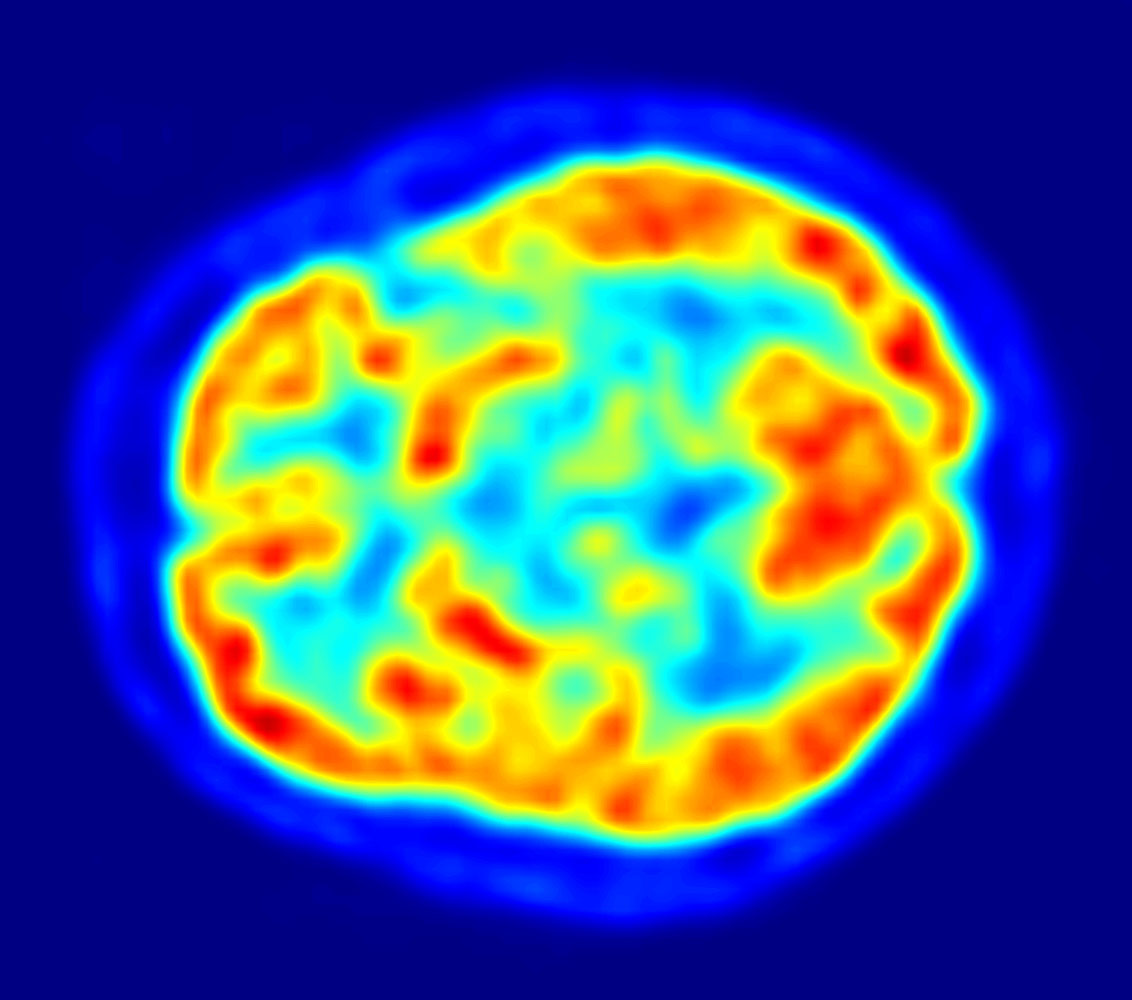
[src](https://en.wikipedia.org/wiki/Human_brain)
# The Neuron
## Neurons
- There are *biological* neurons.
- Brain cells
- Actually exist
- There are theoretical, machine learning or AI neurons
- Don't "actually" exist
- Are simulated by computers
> [The basic units that receive inputs, each neuron is governed by a threshold and an activation function.](https://www.geeksforgeeks.org/deep-learning/neural-networks-a-beginners-guide/)
## Image, UOregon
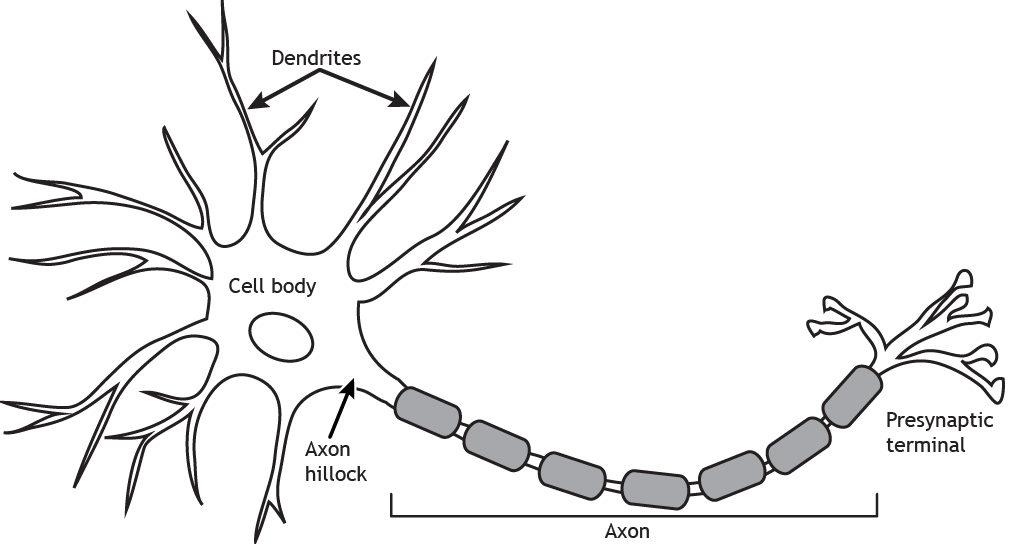
[src](https://opentext.uoregon.edu/neurobiology/chapter/the-neuron-2/)
## Neurons as *Nodes*
:::: {.columns}
::: {.column width="50%"}
- We can treat each *cell body* as a *node* in a graph.
- Or *train station* in Amtrak.
- We can treat each *axon* as an *edge* in graph.
- Or *train connection* in Amtrak
:::
::: {.column width="50%"}
<img src="https://opentext.uoregon.edu/app/uploads/sites/28/2024/07/Neuron.jpg" style="filter:invert(.9)">
:::
::::
## Brains as *Graphs*
- Somehow, information reaches the brain.
- We'll just not worry about that for now, but...
- Touch in the hands/skins
- Vision in the eye
- Olfaction, temperature, etc.
- We'll call these *sensory neurons*
## Example
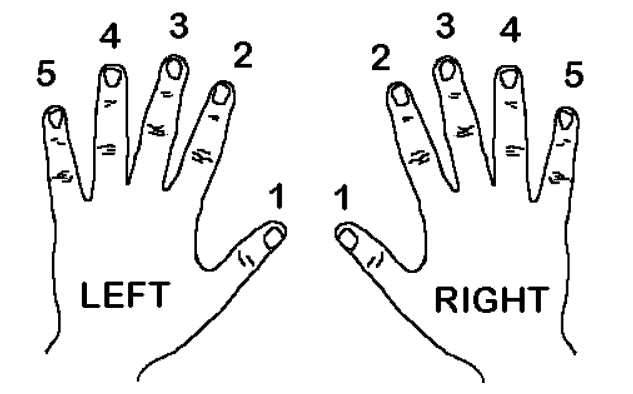
- We imagine, for example, a sensory neuron in each finger.
- We'll use a numbering from [piano instruction](https://www.musicnotes.com/blog/do-i-really-need-to-follow-the-fingerings-in-my-piano-music/).
<img src="https://www.musicnotes.com/blog/content/images/now/wp-content/uploads/image-8.png" style="filter:invert(.9)">
##
```{dot}
//| echo: false
graph SudokuBipartite {
rankdir=TD;
bgcolor="transparent"
node [shape=circle, fontcolor = "#ffffff", color = "#ffffff"]
edge [color = "#ffffff"]
// --- PARTITION 1: SRC ---
subgraph cluster_cells {
rankdir=LR;
node [style=filled, fillcolor="red"];
R5 ; R4 ; R3 ; R2 ; R1 ; L1 ; L2 ; L3 ; L4 ; L5 ;
}
}
```
<center>
<img src="https://www.musicnotes.com/blog/content/images/now/wp-content/uploads/image-8.png" style="filter:invert(.9)" width="50%">
</center>
## Regard
- Fingers as the top, sensing layer in <span style="color:red">RED</span>
- Neurons in the brain as the lower, thinking layer in <span style="color:blue">BLUE</span>
```{dot}
//| echo: false
graph SudokuBipartite {
rankdir=TD;
bgcolor="transparent"
node [shape=circle, fontcolor = "#ffffff", color = "#ffffff"]
edge [color = "transparent"]
// --- PARTITION 1: SRC ---
subgraph cluster_cells {
rankdir=LR;
node [style=filled, fillcolor="red"];
R5 ; R4 ; R3 ; R2 ; R1 ; L1 ; L2 ; L3 ; L4 ; L5 ;
}
// --- PARTITION 2: DST ---
subgraph cluster_cells {
rankdir=LR;
node [style=filled, fillcolor="blue"];
B0 ; B9 ; B8 ; B7 ; B6 ; B5 ; B4 ; B3 ; B2 ; B1 ;
}
R5 -- B0 ;
R4 -- B9 ;
R3 -- B8 ;
R2 -- B7 ;
R1 -- B6 ;
L1 -- B5 ;
L2 -- B4 ;
L3 -- B3 ;
L4 -- B2 ;
L5 -- B1 ;
}
```
## Meaning
- Perhaps the braincell "B3" encodes good movie
- I usually use give two thumbs up - both "R1" and "L1".
:::: {.columns}
::: {.column width="50%"}
```{dot}
//| echo: false
graph SudokuBipartite {
rankdir=TD;
bgcolor="transparent"
node [shape=circle, fontcolor = "#ffffff", color = "#ffffff"]
edge [color = "transparent"]
// --- PARTITION 1: SRC ---
subgraph cluster_cells {
rankdir=LR;
node [style=filled, fillcolor="red"];
R5 ; R4 ; R3 ; R2 ; R1 ; L1 ; L2 ; L3 ; L4 ; L5 ;
}
// --- PARTITION 2: DST ---
subgraph cluster_cells {
rankdir=LR;
node [style=filled, fillcolor="blue"];
B0 ; B9 ; B8 ; B7 ; B6 ; B5 ; B4 ; B3 ; B2 ; B1 ;
}
R5 -- B0 ;
R4 -- B9 ;
R3 -- B8 ;
R2 -- B7 ;
R1 -- B6 ;
L1 -- B5 ;
L2 -- B4 ;
L3 -- B3 ;
L4 -- B2 ;
L5 -- B1 ;
L1 -- B3 [color="#ffffff"] ;
R1 -- B3 [color="#ffffff"] ;
}
```
:::
::: {.column width="50%"}
<img src="https://www.musicnotes.com/blog/content/images/now/wp-content/uploads/image-8.png" style="filter:invert(.9)" width="50%">
:::
::::
## Meaning
- Perhaps the braincell "B5" encodes "pinch of salt"
- I usually use right thumb and index finger - R1 and R2
```{dot}
//| echo: false
graph SudokuBipartite {
rankdir=TD;
bgcolor="transparent"
node [shape=circle, fontcolor = "#ffffff", color = "#ffffff"]
edge [color = "transparent"]
// --- PARTITION 1: SRC ---
subgraph cluster_cells {
rankdir=LR;
node [style=filled, fillcolor="red"];
R5 ; R4 ; R3 ; R2 ; R1 ; L1 ; L2 ; L3 ; L4 ; L5 ;
}
// --- PARTITION 2: DST ---
subgraph cluster_cells {
rankdir=LR;
node [style=filled, fillcolor="blue"];
B0 ; B9 ; B8 ; B7 ; B6 ; B5 ; B4 ; B3 ; B2 ; B1 ;
}
R5 -- B0 ;
R4 -- B9 ;
R3 -- B8 ;
R2 -- B7 ;
R1 -- B6 ;
L1 -- B5 ;
L2 -- B4 ;
L3 -- B3 ;
L4 -- B2 ;
L5 -- B1 ;
L1 -- B3 [color="#ffffff"] ;
R1 -- B3 [color="#ffffff"] ;
R2 -- B5 [color="#ffffff"] ;
R1 -- B5 [color="#ffffff"] ;
}
```
## Meaning
- Perhaps the braincell "B4" encodes "light switch"
- I usually use an index finger - L2 or R2
```{dot}
//| echo: false
graph SudokuBipartite {
rankdir=TD;
bgcolor="transparent"
node [shape=circle, fontcolor = "#ffffff", color = "#ffffff"]
edge [color = "transparent"]
// --- PARTITION 1: SRC ---
subgraph cluster_cells {
rankdir=LR;
node [style=filled, fillcolor="red"];
R5 ; R4 ; R3 ; R2 ; R1 ; L1 ; L2 ; L3 ; L4 ; L5 ;
}
// --- PARTITION 2: DST ---
subgraph cluster_cells {
rankdir=LR;
node [style=filled, fillcolor="blue"];
B0 ; B9 ; B8 ; B7 ; B6 ; B5 ; B4 ; B3 ; B2 ; B1 ;
}
R5 -- B0 ;
R4 -- B9 ;
R3 -- B8 ;
R2 -- B7 ;
R1 -- B6 ;
L1 -- B5 ;
L2 -- B4 ;
L3 -- B3 ;
L4 -- B2 ;
L5 -- B1 ;
L1 -- B3 [color="#ffffff"] ;
R1 -- B3 [color="#ffffff"] ;
R2 -- B5 [color="#ffffff"] ;
R1 -- B5 [color="#ffffff"] ;
R2 -- B4 [color="#ffffff"] ;
L2 -- B4 [color="#ffffff"] ;
}
```
## Another example
- Perhaps fingers and keys on the keyboard.
```{dot}
//| echo: false
graph SudokuBipartite {
rankdir=TD;
bgcolor="transparent"
node [shape=circle, fontcolor = "#ffffff", color = "#ffffff"]
edge [color = "#ffffff"]
node [style=filled, fillcolor="blue"];
L5 [fillcolor="red"];
L4 [fillcolor="red"];
L3 [fillcolor="red"];
L2 [fillcolor="red"];
R2 [fillcolor="red"];
R3 [fillcolor="red"];
R4 [fillcolor="red"];
R5 [fillcolor="red"];
L5 -- A ;
L4 -- S ;
L3 -- D ;
L2 -- F ;
R2 -- J ;
R3 -- K ;
R4 -- L ;
R5 -- ";" ;
}
```
## Typing
- This is how I learned to type!
- Some neurons in my brain associate fingers with keys!
<center>
<a title="Onlinetyping.org, CC BY-SA 4.0 <https://creativecommons.org/licenses/by-sa/4.0>, via Wikimedia Commons" href="https://commons.wikimedia.org/wiki/File:Finger_position_on_a_keyboard.png"><img alt="Finger position on a keyboard" style="filter:invert(.9)" src="https://upload.wikimedia.org/wikipedia/commons/thumb/9/93/Finger_position_on_a_keyboard.png/512px-Finger_position_on_a_keyboard.png?20200324110252"></a>
</center>
## Think, Pair, Share
- When you want to type something.
- What is the first "layer" in the process?
- Spelling? Sound? Meaning?
- What is the last "layer" - the thing that happens.
- Consider the case of a [*motor neuron*](�https://en.wikipedia.org/wiki/Motor_neuron)
- How does this correspond to a graph
# Fin
- I will see you Wednesday for lab: Weights.