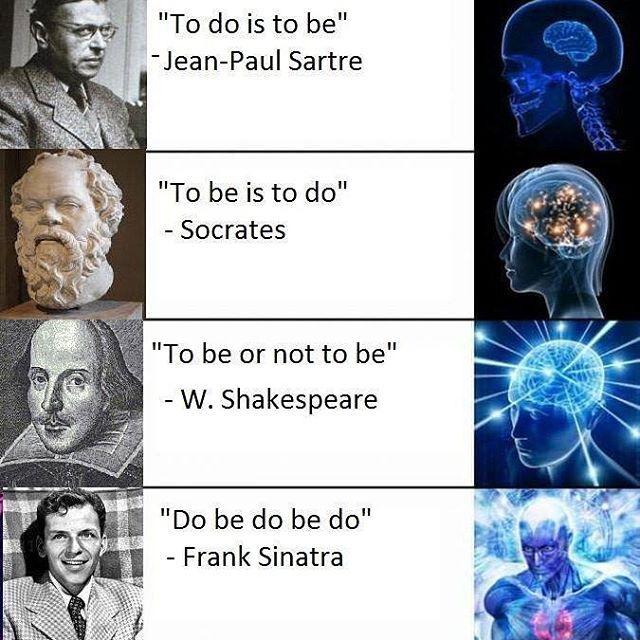
The point of this class isn’t writing that code, but I will show it for the interested student!
Finding what’s next
I loop over all quotes.
I loop over all words in the quotes.
If the current word is “to”, I save the next word.
I look at all the next words.
next= []for quote in words:for loc, word inenumerate(quote):if word =="to":next.append(quote[loc +1])print(next)
['do', 'be', 'be', 'do', 'be', 'be']
Do this for all words
We aren’t restricted for doing this just for “to”
Do it for all the words!
We have to add one special case.
We check quote length to make sure there is a next word.
nexts = []for first in unique:next= []for quote in words:for loc, word inenumerate(quote):if word == first and loc +1<len(quote):next.append(quote[loc +1]) nexts.append(next)
We’ll use another coding thing that I should mention.
I think it will be important to AI in the future, not seeing much usage now.
Key-Value Storage
A dictionary
What we really need is something a lot like a dictionary.
Rather just have a list of lists of words, we want a list of words for each starting word.
Dictionaries also contain “lists of words” (definitions) for each word.
In computing, we term this “key-value storage”.
Keys are words
Values are definitions.
Colab has dictionaries
There so happens to be something called a dictionary (well, a dict) I can use.
d =dict()print(d)
{}
Adding keys
We add things to dictionary as key-value pairs
We take the name of the dictionary, like my_values
We add box brackets []
Within those brackets, we give the key (e.g. the word for which we are storing the definition
We use single-equals assignment to set the value of the key within the dictionary.
Like this:
d["to"] = ['do', 'be', 'be', 'do', 'be', 'be']
Seeing values
It is easy enough to see a value from here.
Same as setting a value, just without single-equals assignment.
We take the name of the dictionary, like my_values
We add box brackets []
Within those brackets, we give the key (e.g. the word for which we are storing the definition
print(d["to"])
['do', 'be', 'be', 'do', 'be', 'be']
Back To Work
Use A dict
Same as before, but we use a dictionary.
The key is “before” or “first” word.
The value is the “next” or “second” word.
nexts =dict()for first in unique:next= []for quote in words:for loc, word inenumerate(quote):if word == first and loc +1<len(quote):next.append(quote[loc +1]) nexts[first] =next
is ['to', 'to']
be ['is', 'or', 'do', 'do']
do ['is', 'be', 'be']
or ['no']
to ['do', 'be', 'be', 'do', 'be', 'be']
no ['to']
Takeaways
for first in nexts:print(first, nexts[first])
is ['to', 'to']
be ['is', 'or', 'do', 'do']
do ['is', 'be', 'be']
or ['no']
to ['do', 'be', 'be', 'do', 'be', 'be']
no ['to']
“no” only precedes “to”.
“or” only precedes “no”
“is” only precedes “to”
Others are more complex.
Early sketch
“no” only precedes “to”.
“or” only precedes “no”
“is” only precedes “to”
Meaning of weights
We have a problem now.
Historically, we have used determinism
Every single time we see a six-sided die, we say it represents a six.
Now we must use non-determinism
Sometimes when we see a “to”, it is followed by “be”
Sometimes it is followed by “do”.
How do we handle this?
Calculate Weights
Let’s take an edge weight to be the probability.
“to” will have an edge of weight \(\frac{2}{3}\) going to “be”.
Let’s look at “be”
The way I think of this is:
After a “be”, at 25% probability see an “is”
After a “be”, at 25% probability see an “or”
After a “be”, at 50% probability see an “do”
Generating Text
So, if we want to generate text.
We look at the current word.
We flip a coin or roll a die.
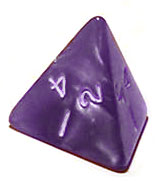
For “be” we use a four-sided die.
And two numbers correspond to “do”.
Rolling Die in Colab
We have already seen random numbers, when setting up our perceptron.
It is easy enough to.
Generate a random number between zero and one.
Multiply it by the number of “next words”
Round or truncate to a whole number
Look up the number in that position, which is now the next number.
In Colab
Here’s the code - don’t worry about understanding it unless you want.
nexts is the dictionary we made earlier.
def next_word(prev_word): die = np.random.rand() possible_words = nexts[prev_word] position = die *len(possible_words) position =int(position)return possible_words[position]
Try it out
We’ll ask for the next word several times and hope to get different answers.
next_word("be")
'or'
next_word("be")
'do'
next_word("be")
'is'
next_word("be")
'do'
next_word("be")
'do'
Generating text
We can now use a neural network to generate text!
We just provide a starting word.
We will also provide a length, though there’s ways around that!
word ="to"print(word)for _ inrange(4): word = next_word(word)print(word)
to
be
do
be
is
Clean it up
Rather than printing each word, we’ll add words together into one big thing to print.
We’ll also put all the code in a function.
We’ll allow the function to accept a starting word and a length.
def make_text(first_word, num_words): text = first_word word = first_wordfor _ inrange(num_words -1): word = next_word(word) text = text +" "+ wordprint(text)
Some examples
make_text("to", 5)
to be or no to
make_text("to", 5)
to be do be do
make_text("to", 5)
to do be is to
make_text("to", 5)
to do is to be
make_text("to", 5)
to be do is to
make_text("to", 5)
to be do be or
make_text("to", 5)
to do be is to
More examples
Longer.
make_text("to", 10)
to be do be is to do be or no
make_text("to", 10)
to be do be do is to be do is
Start with other words.
make_text("be", 5)
be is to be is
make_text("no", 5)
no to be do is
make_text("is", 5)
is to be do is
Bonuses
If Time
We can look at start and stop tokens.
We can discuss attention.
Summary
What we learned
You can generate text with neural networks.
We used a single layer, but of course…
It seems an awful lot like you can do anything by stacking them.
---title: Markov---## Today- Thus far we have: - Used multi-layer networks to do tasks of (potentially) arbitrary complexity. - Only looked at vision - Now, we look at text generation.- These used to be called "Markov chains", so I named this "Markov" - I don't know who "Markov" is.# Recap## My Lab Solution```{python}import numpy as npdice = np.array([ [0,0,0,0,1,0,0,0,0], [0,0,1,0,0,0,1,0,0], [1,0,0,0,0,0,0,0,1], [0,0,1,0,1,0,1,0,0], [1,0,0,0,1,0,0,0,1], [1,0,1,0,0,0,1,0,1], [1,0,1,0,1,0,1,0,1], [1,0,1,1,0,1,1,0,1]])compress = dice[:,:5]top = np.array([ [-1.0, 3.0, -1.0, 3.0, 1.0], # 1 ior 6 [ 1.0, -2.0, 1.0, -2.0, 0.0], # 2, 3, 4, or 5 [ 0.5, -2.0, 0.5, -2.0, 0.0], # 4 ior 5 [ 0.0, 0.0, 0.0, 0.0, 1.0], # Odd])top = top.transpose()bot = np.array([ [ 0.5, -1.0, -1.0, 0.5], # 1 [-1.0, 1.0, -1.0, -1.0], # 2 [-1.0, 0.5, -1.0, 0.5], # 3 [-1.0, 0.5, 0.5, -1.0], # 4 [-1.0, 0.4, 0.4, 0.4], # 5 [ 1.0, -1.0, -1.0, -1.0], # 6])bot = bot.transpose()for die in compress:print(1<= (1<= die @ top) @ bot)```# Motivation## Vision- I personally have a soft spot for computer vision. - I think it's quality is quite high. - I think computer vision frameworks are better at recognizing images than humans. - I believe image generation (when done properly) is *completely* indistinguishable from photography, even to experts.## Text- I could not, realistically, how a lower opinion of large language models, like ChatGPT or Gemini - I basically don't think they can do anything "worth doing" - They can, for example, write emails that aren't worth sending. - For some reason, they have "broken out" of computer science into broader cultural relevance. - In a way that vision frameworks have not.## Nevertheless!- The *raison d'être* for this course is that "the powers that be" now think AI is a big deal because of LLMs.- So, let's generate some text.## Differences- Like with seeing dice, we need to somehow package up words into neurons.- Like with predicting numbers, we need to somehow back up... also words into neurons, again? - LLMs go from words-to-words, vision goes from images-to-words.## Setting the stage- ImageNet, the big vision thing, came out in 2006.- The LLM was developed in 2017- ChatGPT became "prominent" in 2023## Looking at Google- We'll do Google relative - they competed in ImageNet, developed the LLM, and have a pretty major one (Gemini).- How big is Google? - In 2006, 122 billion USD market cap - In 2017, 729 billion USD market cap - In 2026, 3680 billion USD market cap- Why does this matter?## Scaling- There are a lot of words. - And there are more words in a sentence than there are in general. - For example, that previous line contained "in" twice. - Basically, more than 9 inputs (for dice).- The thing that held up LLMs was not having enough computing power to encode all words.## Our example:::: {.columns}::: {.column width="50%"}- We'll use an extremely restricted example, inspired by a meme I saw once.:::::: {.column width="50%"}:::::::## Punch into Colab- I just typed these into Colab. - I used all lower case and no punctuation (and change "not" to "no" for length) - This is a similar "simplifying assumption" as regarded dots as *only* present or absent.```{python}sar ="to do is to be"soc ="to be is to do"sha ="to be or no to be"sin ="do be do be do"all= [sar, soc, sha, sin]```## Tokenizing- There's a core insight in *computational linguistics* called "tokenization".- Somehow, have to break up words into things that can be recognized by a "sensory neuron".- I treat individual words as tokens. - This could be an entire class.```{python}words = [quote.split() for quote inall]print(words)```## Sets- I want to see how many *unique* words there are. - Obviously, "to" appears *many* times.- I use a "set", a mathematical object that is a (1) collection with (2) no duplicates. - They also aren't ordered, which doesn't really matter here.```{python}sets = [set(quote) for quote in words]print(sets)```## Unique words- How many words are there across all three phrases?- I take the *union* of sets, which is all elements in at least one set.```{python}unique =set.union(*sets)print(unique)```- Only 6 words! Not too bad! - Only one more than our compressed dice.## Making a Network- We can make something that looks an awful lot like a perceptron!```{dot}//| echo: falsegraph SudokuBipartite { rankdir=TB; bgcolor="transparent" node [shape=circle, fontcolor = "#ffffff", color = "#ffffff"] edge [color = "white"] // --- PARTITION 1: SRC --- subgraph cluster_cells { rankdir=LR; node [style=filled, fillcolor="red"]; OR; DO; IS; NO; BE; TO; } // --- PARTITION 2: DST --- subgraph cluster_cells { rankdir=RL; node [fillcolor="blue"]; OR1 [label="OR"]; DO1 [label="DO"]; IS1 [label="IS"]; NO1 [label="NO"]; BE1 [label="BE"]; TO1 [label="TO"]; } OR -- {OR1, DO1, IS1, NO1, BE1, TO1}; DO -- {OR1, DO1, IS1, NO1, BE1, TO1}; IS -- {OR1, DO1, IS1, NO1, BE1, TO1}; NO -- {OR1, DO1, IS1, NO1, BE1, TO1}; BE -- {OR1, DO1, IS1, NO1, BE1, TO1}; TO -- {OR1, DO1, IS1, NO1, BE1, TO1};}```## Edge Weights- How do we determine edge weights?- Or perhaps, what are we trying to do?- Let's imagine what our task is: - We want to generate text given some text, so... - Given a word, produce the next word.## Words-to-words- So, what do we do? - Let's take a look at our "quotes". - Let's see which words follow which other words. - Perhaps at which probability. - Let's plug those in as edge weights.## First things first- Let's just look at one word - the first word we see.```{python}words```- Okay, that word is "to".## Second things second- What words can follow "to". - Well, it looks to me like "do" and "be" - I can write some code to make sure. - The point of this class isn't writing that code, but I will show it for the interested student!## Finding what's next- I loop over all quotes. - I loop over all words in the quotes. - If the current word is "to", I save the next word.- I look at all the next words.```{python}next= []for quote in words:for loc, word inenumerate(quote):if word =="to":next.append(quote[loc +1])print(next)```## Do this for all words- We aren't restricted for doing this just for "to"- Do it for all the words! - We have to add one special case. - We check quote length to make sure there is a next word.```{python}nexts = []for first in unique:next= []for quote in words:for loc, word inenumerate(quote):if word == first and loc +1<len(quote):next.append(quote[loc +1]) nexts.append(next)```## Let's see it```{python}print(nexts)```- Oh... that is tough to understand. - We'll use another coding thing that I should mention. - I think it will be important to AI in the future, not seeing much usage now.# Key-Value Storage## A dictionary- What we really need is something a lot like a dictionary. - Rather just have a list of lists of words, we want a list of words for each starting word. - Dictionaries also contain "lists of words" (definitions) for each word.- In computing, we term this "key-value storage". - Keys are words - Values are definitions.## Colab has dictionaries- There so happens to be something called a dictionary (well, a `dict`) I can use.```{python}d =dict()print(d)```## Adding keys- We add things to dictionary as *key-value pairs* - We take the name of the dictionary, like `my_values` - We add box brackets `[]` - Within those brackets, we give the key (e.g. the word for which we are storing the definition - We use single-equals assignment to set the value of the key within the dictionary.- Like this:```{python}d["to"] = ['do', 'be', 'be', 'do', 'be', 'be']```## Seeing values- It is easy enough to see a value from here.- Same as setting a value, just without single-equals assignment. - We take the name of the dictionary, like `my_values` - We add box brackets `[]` - Within those brackets, we give the key (e.g. the word for which we are storing the definition```{python}print(d["to"])```# Back To Work## Use A `dict`- Same as before, but we use a dictionary. - The key is "before" or "first" word. - The value is the "next" or "second" word.```{python}nexts =dict()for first in unique:next= []for quote in words:for loc, word inenumerate(quote):if word == first and loc +1<len(quote):next.append(quote[loc +1]) nexts[first] =next```## Easier to see- Recall - we are doing this to find *edge weights*```{python}print(nexts)```- A bit easier visually with some formatting.```{python}for first in nexts:print(first, nexts[first])```## Takeaways```{python}for first in nexts:print(first, nexts[first])```- "no" only precedes "to".- "or" only precedes "no"- "is" only precedes "to"- Others are more complex.## Early sketch:::: {.columns}::: {.column width="50%"}- "no" only precedes "to".- "or" only precedes "no"- "is" only precedes "to":::::: {.column width="50%"}```{dot}//| echo: false//| fig-width: 400pxgraph SudokuBipartite { rankdir=TB; bgcolor="transparent" node [shape=circle, fontcolor = "#ffffff", color = "#ffffff"] edge [color = "white"] // --- PARTITION 1: SRC --- subgraph cluster_cells { rankdir=LR; node [style=filled, fillcolor="red"]; OR; IS; NO; } // --- PARTITION 2: DST --- subgraph cluster_cells { rankdir=RL; node [fillcolor="blue"]; NO1 [label="NO"]; TO1 [label="TO"]; } OR -- {NO1}; IS -- {TO1}; NO -- {TO1};}```:::::::## Meaning of weights- We have a problem now.- Historically, we have used *determinism* - Every single time we see a six-sided die, we say it represents a six.- Now we must use *non-determinism* - Sometimes when we see a "to", it is followed by "be" - Sometimes it is followed by "do". - How do we handle this?## Calculate Weights- Let's take an edge weight to be the *probability*.- "to" will have an edge of weight $\frac{2}{3}$ going to "be".```{dot}//| echo: falsegraph SudokuBipartite { rankdir=TB; bgcolor="transparent" node [shape=circle, fontcolor = "#ffffff", color = "#ffffff"] edge [color = "white"] // --- PARTITION 1: SRC --- subgraph cluster_cells { rankdir=LR; node [style=filled, fillcolor="red"]; OR; DO; IS; NO; BE; TO; } // --- PARTITION 2: DST --- subgraph cluster_cells { rankdir=RL; node [fillcolor="blue"]; OR1 [label="OR"]; DO1 [label="DO"]; IS1 [label="IS"]; NO1 [label="NO"]; BE1 [label="BE"]; TO1 [label="TO"]; } NO -- {TO1} [penwidth=3.0] ; BE -- {IS1, OR1} [penwidth=.75] ; BE -- {DO1} [penwidth=1.5] ; DO -- {IS1} [penwidth=1] ; DO -- {BE1} [penwidth=2] ; TO -- {DO1} [penwidth=1] ; TO -- {BE1} [penwidth=2] ; IS -- {TO1}; OR -- {NO1};}```## Let's look at "be":::: {.columns}::: {.column width="50%"}- The way I think of this is: - After a "be", at 25% probability see an "is" - After a "be", at 25% probability see an "or" - After a "be", at 50% probability see an "do":::::: {.column width="50%"}```{dot}//| echo: false//| fig-width: 400pxgraph SudokuBipartite { rankdir=TB; bgcolor="transparent" node [shape=circle, fontcolor = "#ffffff", color = "#ffffff"] edge [color = "white"] // --- PARTITION 1: SRC --- subgraph cluster_cells { rankdir=LR; node [style=filled, fillcolor="red"]; BE; } // --- PARTITION 2: DST --- subgraph cluster_cells { rankdir=RL; node [fillcolor="blue"]; OR1 [label="OR"]; IS1 [label="IS"]; DO1 [label="DO"]; } BE -- {IS1, OR1} [penwidth=.75] ; BE -- {DO1} [penwidth=1.5] ;}```:::::::## Generating Text- So, if we want to generate text. - We look at the current word. - We flip a coin or roll a die.- For "be" we use a four-sided die. - And two numbers correspond to "do".<img src="https://upload.wikimedia.org/wikipedia/commons/1/19/4-sided_dice_250.jpg" style="filter:invert(.9)">## Rolling Die in Colab- We have already seen random numbers, when setting up our perceptron.- It is easy enough to. - Generate a random number between zero and one. - Multiply it by the number of "next words" - Round or truncate to a whole number - Look up the number in that position, which is now the next number.## In Colab- Here's the code - don't worry about understanding it unless you want. - `nexts` is the dictionary we made earlier.```{python}def next_word(prev_word): die = np.random.rand() possible_words = nexts[prev_word] position = die *len(possible_words) position =int(position)return possible_words[position]```## Try it out- We'll ask for the next word several times and hope to get different answers.```{python}next_word("be")``````{python}next_word("be")``````{python}next_word("be")``````{python}next_word("be")``````{python}next_word("be")```## Generating text- We can now use a neural network to generate text!- We just provide a starting word. - We will also provide a length, though there's ways around that!```{python}word ="to"print(word)for _ inrange(4): word = next_word(word)print(word)```## Clean it up- Rather than printing each word, we'll add words together into one big thing to print.- We'll also put all the code in a function.- We'll allow the function to accept a starting word and a length.```{python}def make_text(first_word, num_words): text = first_word word = first_wordfor _ inrange(num_words -1): word = next_word(word) text = text +" "+ wordprint(text)```## Some examples```{python}make_text("to", 5)``````{python}make_text("to", 5)``````{python}make_text("to", 5)``````{python}make_text("to", 5)``````{python}make_text("to", 5)``````{python}make_text("to", 5)``````{python}make_text("to", 5)```## More examples- Longer.```{python}make_text("to", 10)``````{python}make_text("to", 10)```- Start with other words.```{python}make_text("be", 5)``````{python}make_text("no", 5)``````{python}make_text("is", 5)```# Bonuses## If Time- We can look at start and stop tokens.- We can discuss attention.# Summary## What we learned- You can generate text with neural networks.- We used a single layer, but of course... - It seems an awful lot like you can do *anything* by stacking them.# Fin